
Open the customer packages tab
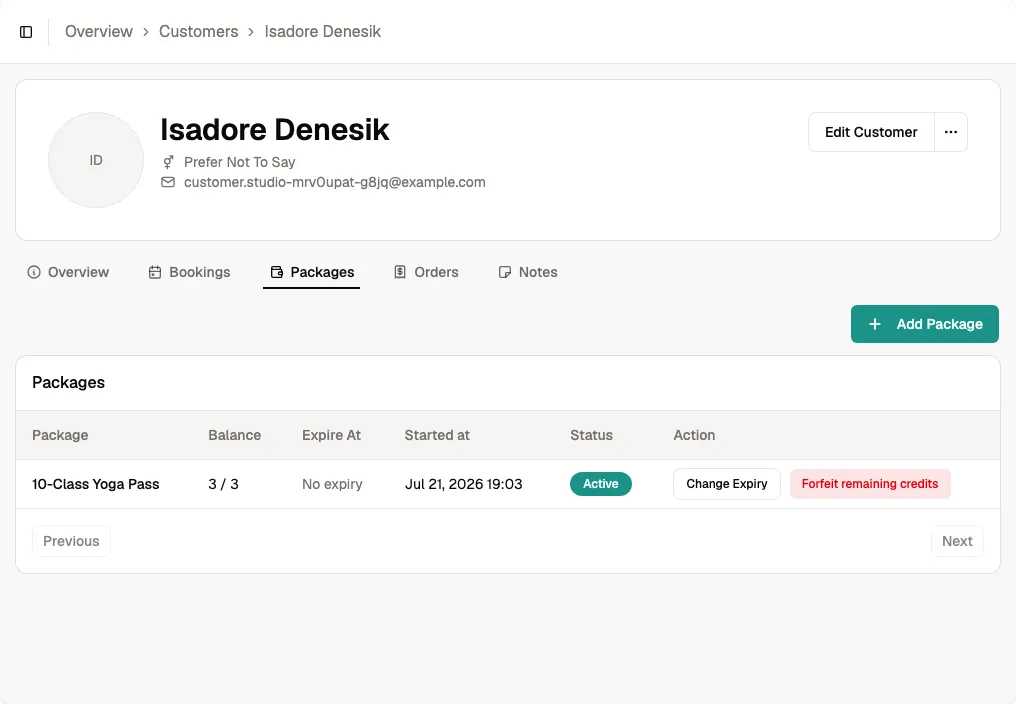
Navigate to the customer detail page and switch to Packages. Credit packages show credits used, credits remaining, expiry, and an edit action. Pass packages show their time-based validity but do not offer expiry editing.
Edit the package
Find the credit package you want to update and click Edit. A form opens with its current expiry date and credit balance.
Change the expiry date using the date picker. You can extend it or bring it forward; the credit balance remains unchanged. Pass validity is fixed when the pass is assigned or purchased.
Tip Extending a package is a common goodwill gesture for loyal customers who could not attend due to illness or travel.
Save the change
Click Save to apply the new expiry date. The customer can use their remaining credits until the updated date.
The change is applied immediately.